

Tools and Examples - Part 1#
Assigning monomials to receptor model states and transitions#
The notebook in receptor_tools.ipynb (see Appendix) contains function definitions that will prove useful as we further explore receptor modeling. The command %run receptor_tools.ipynb loads these function definitions, and the remainder of this notebook illustrates how to use some of them. The focus is on tools that assign monomials to receptor model states and transitions (i.e., graph vertices and edges). Doing this makes the structure of a receptor model easier to understand. It also facilitates symbolic calculations that begin with the state-transition diagram of a receptor model.
%%capture
%run receptor_tools.ipynb
To begin we specify the states and transitions of a receptor model as an undirected graph. For simplicity, we will use a four-state model with one cycle.
pos = {0: (0, 0), 1: (1, 1.41), 2: (2, 0), 3: (4,0)} # vertex positions
G = Graph({0: [1, 2], 1: [2], 2: [3]},pos=pos)

G.show(figsize=4,graph_border=True)
G.show(figsize=4,graph_border=True,edge_labels=True)
A module that was compiled using NumPy 1.x cannot be run in
NumPy 2.2.6 as it may crash. To support both 1.x and 2.x
versions of NumPy, modules must be compiled with NumPy 2.0.
Some module may need to rebuild instead e.g. with 'pybind11>=2.12'.

If you are a user of the module, the easiest solution will be to
downgrade to 'numpy<2' or try to upgrade the affected module.
We expect that some modules will need time to support NumPy 2.

Traceback (most recent call last):  File "/usr/lib/python3.10/runpy.py", line 196, in _run_module_as_main
    return _run_code(code, main_globals, None,
  File "/usr/lib/python3.10/runpy.py", line 86, in _run_code
    exec(code, run_globals)
  File "/usr/lib/python3/dist-packages/sage/repl/ipython_kernel/__main__.py", line 3, in <module>
    IPKernelApp.launch_instance(kernel_class=SageKernel)
  File "/usr/lib/python3/dist-packages/traitlets/config/application.py", line 846, in launch_instance
    app.start()
  File "/usr/lib/python3/dist-packages/ipykernel/kernelapp.py", line 677, in start
    self.io_loop.start()
  File "/usr/lib/python3/dist-packages/tornado/platform/asyncio.py", line 199, in start
    self.asyncio_loop.run_forever()
  File "/usr/lib/python3.10/asyncio/base_events.py", line 603, in run_forever
    self._run_once()
  File "/usr/lib/python3.10/asyncio/base_events.py", line 1909, in _run_once
    handle._run()
  File "/usr/lib/python3.10/asyncio/events.py", line 80, in _run
    self._context.run(self._callback, *self._args)
  File "/usr/lib/python3/dist-packages/ipykernel/kernelbase.py", line 461, in dispatch_queue
    await self.process_one()
  File "/usr/lib/python3/dist-packages/ipykernel/kernelbase.py", line 450, in process_one
    await dispatch(*args)
  File "/usr/lib/python3/dist-packages/ipykernel/kernelbase.py", line 357, in dispatch_shell
    await result
  File "/usr/lib/python3/dist-packages/ipykernel/kernelbase.py", line 652, in execute_request
    reply_content = await reply_content
  File "/usr/lib/python3/dist-packages/ipykernel/ipkernel.py", line 353, in do_execute
    res = shell.run_cell(code, store_history=store_history, silent=silent)
  File "/usr/lib/python3/dist-packages/ipykernel/zmqshell.py", line 532, in run_cell
    return super().run_cell(*args, **kwargs)
  File "/usr/lib/python3/dist-packages/IPython/core/interactiveshell.py", line 2914, in run_cell
    result = self._run_cell(
  File "/usr/lib/python3/dist-packages/IPython/core/interactiveshell.py", line 2960, in _run_cell
    return runner(coro)
  File "/usr/lib/python3/dist-packages/IPython/core/async_helpers.py", line 78, in _pseudo_sync_runner
    coro.send(None)
  File "/usr/lib/python3/dist-packages/IPython/core/interactiveshell.py", line 3185, in run_cell_async
    has_raised = await self.run_ast_nodes(code_ast.body, cell_name,
  File "/usr/lib/python3/dist-packages/IPython/core/interactiveshell.py", line 3377, in run_ast_nodes
    if (await self.run_code(code, result,  async_=asy)):
  File "/usr/lib/python3/dist-packages/IPython/core/interactiveshell.py", line 3457, in run_code
    exec(code_obj, self.user_global_ns, self.user_ns)
  File "/tmp/ipykernel_12692/2686798859.py", line 4, in <module>
    G.show(figsize=Integer(4),graph_border=True)
  File "/usr/lib/python3/dist-packages/sage/graphs/generic_graph.py", line 20195, in show
    return self.graphplot(**plot_kwds).show(**kwds)
  File "/usr/lib/python3/dist-packages/sage/graphs/graph_plot.py", line 1026, in show
    self.plot().show(**kwds)
  File "/usr/lib/python3/dist-packages/sage/misc/decorators.py", line 410, in wrapper
    return func(*args, **kwds)
  File "/usr/lib/python3/dist-packages/sage/plot/graphics.py", line 2133, in show
    dm.display_immediately(self, **kwds)
  File "/usr/lib/python3/dist-packages/sage/repl/rich_output/display_manager.py", line 851, in display_immediately
    plain_text, rich_output = self._rich_output_formatter(obj, rich_repr_kwds)
  File "/usr/lib/python3/dist-packages/sage/repl/rich_output/display_manager.py", line 643, in _rich_output_formatter
    rich_output = self._call_rich_repr(obj, rich_repr_kwds)
  File "/usr/lib/python3/dist-packages/sage/repl/rich_output/display_manager.py", line 601, in _call_rich_repr
    return obj._rich_repr_(self, **rich_repr_kwds)
  File "/usr/lib/python3/dist-packages/sage/plot/graphics.py", line 1000, in _rich_repr_
    return display_manager.graphics_from_save(
  File "/usr/lib/python3/dist-packages/sage/repl/rich_output/display_manager.py", line 731, in graphics_from_save
    save_function(filename, **kwds)
  File "/usr/lib/python3/dist-packages/sage/misc/decorators.py", line 410, in wrapper
    return func(*args, **kwds)
  File "/usr/lib/python3/dist-packages/sage/plot/graphics.py", line 3296, in save
    from matplotlib import rcParams
  File "/usr/lib/python3/dist-packages/matplotlib/__init__.py", line 109, in <module>
    from . import _api, _version, cbook, docstring, rcsetup
  File "/usr/lib/python3/dist-packages/matplotlib/rcsetup.py", line 27, in <module>
    from matplotlib.colors import Colormap, is_color_like
  File "/usr/lib/python3/dist-packages/matplotlib/colors.py", line 56, in <module>
    from matplotlib import _api, cbook, scale
  File "/usr/lib/python3/dist-packages/matplotlib/scale.py", line 23, in <module>
    from matplotlib.ticker import (
  File "/usr/lib/python3/dist-packages/matplotlib/ticker.py", line 136, in <module>
    from matplotlib import transforms as mtransforms
  File "/usr/lib/python3/dist-packages/matplotlib/transforms.py", line 46, in <module>
    from matplotlib._path import (
---------------------------------------------------------------------------
AttributeError                            Traceback (most recent call last)
AttributeError: _ARRAY_API not found
---------------------------------------------------------------------------
ImportError                               Traceback (most recent call last)
/tmp/ipykernel_12692/2686798859.py in <module>
      2 G = Graph({Integer(0): [Integer(1), Integer(2)], Integer(1): [Integer(2)], Integer(2): [Integer(3)]},pos=pos)
      3
----> 4 G.show(figsize=Integer(4),graph_border=True)
      5 G.show(figsize=Integer(4),graph_border=True,edge_labels=True)

/usr/lib/python3/dist-packages/sage/graphs/generic_graph.py in show(self, method, **kwds)
  20193         plot_kwds = {k: kwds.pop(k) for k in graphplot_options if k in kwds}
  20194
> 20195         return self.graphplot(**plot_kwds).show(**kwds)
  20196
  20197     def plot3d(self, bgcolor=(1,1,1),

/usr/lib/python3/dist-packages/sage/graphs/graph_plot.py in show(self, **kwds)
   1024                 kwds[k] = value
   1025
-> 1026         self.plot().show(**kwds)
   1027
   1028     def plot(self, **kwds):

/usr/lib/python3/dist-packages/sage/misc/decorators.py in wrapper(*args, **kwds)
    408             kwds[self.name + "options"] = suboptions
    409
--> 410             return func(*args, **kwds)
    411
    412         # Add the options specified by @options to the signature of the wrapped

/usr/lib/python3/dist-packages/sage/plot/graphics.py in show(self, **kwds)
   2131         from sage.repl.rich_output import get_display_manager
   2132         dm = get_display_manager()
-> 2133         dm.display_immediately(self, **kwds)
   2134
   2135     def xmin(self, xmin=None):

/usr/lib/python3/dist-packages/sage/repl/rich_output/display_manager.py in display_immediately(self, obj, **rich_repr_kwds)
    849             1/2
    850         """
--> 851         plain_text, rich_output = self._rich_output_formatter(obj, rich_repr_kwds)
    852         self._backend.display_immediately(plain_text, rich_output)
    853

/usr/lib/python3/dist-packages/sage/repl/rich_output/display_manager.py in _rich_output_formatter(self, obj, rich_repr_kwds)
    641         has_rich_repr = isinstance(obj, SageObject) and hasattr(obj, '_rich_repr_')
    642         if has_rich_repr:
--> 643             rich_output = self._call_rich_repr(obj, rich_repr_kwds)
    644         if isinstance(rich_output, OutputPlainText):
    645             plain_text = rich_output

/usr/lib/python3/dist-packages/sage/repl/rich_output/display_manager.py in _call_rich_repr(self, obj, rich_repr_kwds)
    599         if rich_repr_kwds:
    600             # do not ignore errors from invalid options
--> 601             return obj._rich_repr_(self, **rich_repr_kwds)
    602         try:
    603             return obj._rich_repr_(self)

/usr/lib/python3/dist-packages/sage/plot/graphics.py in _rich_repr_(self, display_manager, **kwds)
    998         for file_ext, output_container in preferred:
    999             if output_container in display_manager.supported_output():
-> 1000                 return display_manager.graphics_from_save(
   1001                     self.save, kwds, file_ext, output_container)
   1002

/usr/lib/python3/dist-packages/sage/repl/rich_output/display_manager.py in graphics_from_save(self, save_function, save_kwds, file_extension, output_container, figsize, dpi)
    729         if dpi is not None:
    730             kwds['dpi'] = dpi
--> 731         save_function(filename, **kwds)
    732         from sage.repl.rich_output.buffer import OutputBuffer
    733         buf = OutputBuffer.from_file(filename)

/usr/lib/python3/dist-packages/sage/misc/decorators.py in wrapper(*args, **kwds)
    408             kwds[self.name + "options"] = suboptions
    409
--> 410             return func(*args, **kwds)
    411
    412         # Add the options specified by @options to the signature of the wrapped

/usr/lib/python3/dist-packages/sage/plot/graphics.py in save(self, filename, **kwds)
   3294                              "', '".join(ALLOWED_EXTENSIONS) + "'!")
   3295         else:
-> 3296             from matplotlib import rcParams
   3297             rc_backup = (rcParams['ps.useafm'], rcParams['pdf.use14corefonts'],
   3298                          rcParams['text.usetex'])  # save the rcParams

/usr/lib/python3/dist-packages/matplotlib/__init__.py in <module>
    107 # cbook must import matplotlib only within function
    108 # definitions, so it is safe to import from it here.
--> 109 from . import _api, _version, cbook, docstring, rcsetup
    110 from matplotlib.cbook import MatplotlibDeprecationWarning, sanitize_sequence
    111 from matplotlib.cbook import mplDeprecation  # deprecated

/usr/lib/python3/dist-packages/matplotlib/rcsetup.py in <module>
     25 from matplotlib import _api, cbook
     26 from matplotlib.cbook import ls_mapper
---> 27 from matplotlib.colors import Colormap, is_color_like
     28 from matplotlib.fontconfig_pattern import parse_fontconfig_pattern
     29 from matplotlib._enums import JoinStyle, CapStyle

/usr/lib/python3/dist-packages/matplotlib/colors.py in <module>
     54 import matplotlib as mpl
     55 import numpy as np
---> 56 from matplotlib import _api, cbook, scale
     57 from ._color_data import BASE_COLORS, TABLEAU_COLORS, CSS4_COLORS, XKCD_COLORS
     58

/usr/lib/python3/dist-packages/matplotlib/scale.py in <module>
     21 import matplotlib as mpl
     22 from matplotlib import _api, docstring
---> 23 from matplotlib.ticker import (
     24     NullFormatter, ScalarFormatter, LogFormatterSciNotation, LogitFormatter,
     25     NullLocator, LogLocator, AutoLocator, AutoMinorLocator,

/usr/lib/python3/dist-packages/matplotlib/ticker.py in <module>
    134 import matplotlib as mpl
    135 from matplotlib import _api, cbook
--> 136 from matplotlib import transforms as mtransforms
    137
    138 _log = logging.getLogger(__name__)

/usr/lib/python3/dist-packages/matplotlib/transforms.py in <module>
     44
     45 from matplotlib import _api
---> 46 from matplotlib._path import (
     47     affine_transform, count_bboxes_overlapping_bbox, update_path_extents)
     48 from .path import Path

ImportError: numpy.core.multiarray failed to import
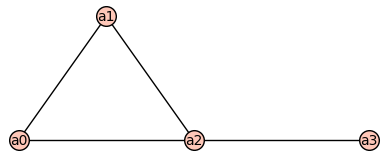
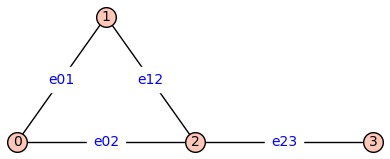
By default the vertices are integers and the edge labels are None. The method show() has a named parameter edge_lablels that is set to False by default (above left). To see the edge labels we repeat the show() command using edge_labels=True.
print_graph#
The first function we will illustrate is print_graph. On the next line, the command mydoc(print_graph) provides information about the usage. As advertized, he command print_graph(G) gives a list of the vertices and edges of G.
mydoc(print_graph)
print_graph(G)
Prints the vertices and edges of the graph G.
print_graph(G)
vertices: [0, 1, 2, 3]
edges: [(0, 1, None), (0, 2, None), (1, 2, None), (2, 3, None)]
add_vertex_monomials#
The next function we will illustrate is add_vertex_monomials.
mydoc(add_vertex_monomials)
add_vertex_monomials(G=Graph on 0 vertices, method='integer', ring=False)
Add monomials to vertices of a graph.
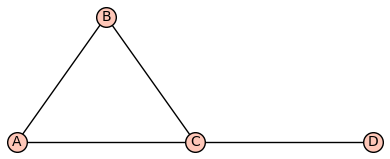
The add_vertex_monomials function takes a graph G, as well as optional parameters method and ring. The function creates a new graph H with vertices labeled by monomials. The monomials are chosen based on the number of vertices in G. If the method parameter is set to ‘alpha’ and the number of vertices in G is less than or equal to 10, the monomials are chosen as alphabetical letters (‘a’ to ‘k’). Otherwise, the monomials are chosen as strings of the form ‘a0’, ‘a1’, …, ‘an-1’, where n is the number of vertices in G. The function then adds the vertices from G to H using the monomials as labels, and adds the edges from G to H using the monomials as endpoints. If the ring parameter is set to True, the function also creates a polynomial ring V with the chosen monomials and ‘invlex’ order, and returns both H and V. Otherwise, it returns only H.
INPUT:
G– graph object (default:Graph());method– integer (default:integer);
OUTPUT:
The graph with monomials as vertices
H=add_vertex_monomials(G)
H.show(figsize=4)
H2=add_vertex_monomials(G,method='alpha')
H2.show(figsize=4)
add_edge_monomials()#
mydoc(add_edge_monomials)
add_edge_monomials(G0, method='integer', edge_vars=['b', 'c', 'd', 'e', 'f', 'g', 'h', 'i', 'j', 'k', 'l', 'm', 'n', 'o', 'p', 'q', 'r', 's', 't', 'u', 'v', 'w', 'x', 'y', 'z'], ring=False, short_name=False)
Add monomials to edges of a graph.
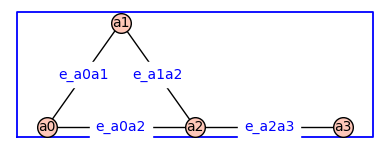
The add_edge_monomials function takes a graph G, as well as optional parameters method, edge_vars, ring, and short_name. If method is set to ‘integer’, the function creates a polynomial ring using the given edge variables and assigns variables to the edges of the graph. The edge variables can be represented either as ‘e’ followed by the first vertex label or the first and second vertex labels concatenated. If the vertex labels are integers and the short_name parameter is set to True, the edge variables are created using only the first vertex label. If method is set to ‘alpha’, the function creates a polynomial ring using the given edge variables and assigns variables to the edges of the graph in reverse order. The number of edge variables used is determined by the size of the graph. The ring parameter, if set to True, injects the polynomial variables into the global namespace and returns the graph and the polynomial ring. Otherwise, it simply returns the graph.
INPUT:
G– graph object (default:Graph());method– integer (default:integer);
OUTPUT:
The graph with monomials as edges
H3=add_edge_monomials(G)
H3.show(figsize=4,edge_labels=True)
The function add_edge_monomials()also works when vertices are variables from a polynomial ring.
H4=add_edge_monomials(H)
H4.show(figsize=4,graph_border=True,edge_labels=True)
Using method='alpha' in add_edge_monomials() creates simpler edge labels
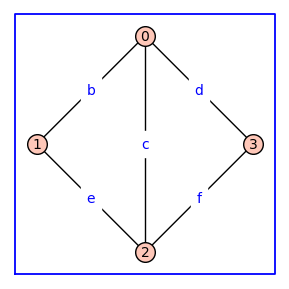
G = graphs.CycleGraph(4); G.add_edge(0,2)
G = add_edge_monomials(G,method='alpha')
G.show(figsize=4,graph_border=True,edge_labels=True)
Using ring=True in add_vertex_monomials() constructs a polynomial ring over the variables that label the vertices
(G,V) = add_vertex_monomials(graphs.HouseGraph(),ring=True)
show(V)
V.inject_variables()
fv = (a0+a1)*(a0+a3+a4)^2
print(fv)
Defining a0, a1, a2, a3, a4
a1*a4^2 + a0*a4^2 + 2*a1*a3*a4 + 2*a0*a3*a4 + 2*a0*a1*a4 + 2*a0^2*a4 + a1*a3^2 + a0*a3^2 + 2*a0*a1*a3 + 2*a0^2*a3 + a0^2*a1 + a0^3
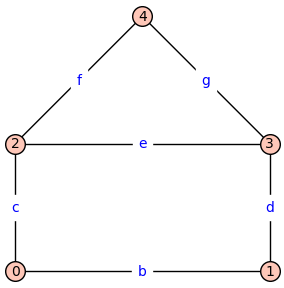
Using ring=True in add_edge_monomials() constructs a polynomial ring over the variables that label the edges
(G,E) = add_edge_monomials(graphs.HouseGraph(),method='alpha',ring=True)
show(E)
G.show(figsize=4,edge_labels=True)
E.inject_variables()
fe = (b+c)*(b+e+f)^2
print(fe)
Defining b, c, d, e, f, g
c*f^2 + b*f^2 + 2*c*e*f + 2*b*e*f + 2*b*c*f + 2*b^2*f + c*e^2 + b*e^2 + 2*b*c*e + 2*b^2*e + b^2*c + b^3